Brightest Flashlight Launcher
- 4.3
- Rating
- 5.00M
- Installs
- Free
- Price
 Analysis by App-foxy
I have lost count of how many times I needed a light at exactly the wrong moment: beside the bed, near a dark doorway, under a car seat, or while searching through a bag. Unlocking a phone, finding the right folder, and opening a full app is a small task, but it becomes surprisingly annoying when my hands are busy or I am already in a hurry. Brightest Flashlight Launcher is built around removing that repeated delay. It is a free tools app from AtomApplications that combines a flashlight with a magnifying-glass function, giving quick access to two simple utilities in one place.
After spending time with it, I see the main appeal less as “the brightest light” and more as reducing the number of steps between a problem and a useful tool. That distinction matters. If you want a feature-heavy camera replacement, this is not the right direction. If you want a straightforward emergency light and an occasional way to inspect small text or objects, its focused design makes sense.
Why a small delay matters in real life
A flashlight is one of those tools I rarely think about until I need it. The usual alternative is already on the phone, but reaching it can involve waking the screen, unlocking the device, opening quick settings, locating the flashlight control, and tapping it. The exact process varies by phone, and the control may be hidden behind other shortcuts. That is manageable in a calm room, but not when I am carrying groceries, standing outside, or trying not to wake someone.
You May Also Like

 Blood Strike: 2.5 Anniversary
Blood Strike’s Loadouts Turn Every Drop Into a Tactical Gamble
A close look at Blood Strike’s custom loadouts: how fast access to signature weapons reshapes its battle royale rhythm, rewards preparation, and narrows the gap between fights.

 Pandora - Music & Podcasts
Pandora’s Music Is Easy to Start, but Harder to Recover
Pandora’s strength is its low-effort path from a seed to a station. Its weak spot is how much confidence it asks you to place in connection, setup, and quiet recovery.

 8 Ball Pool
 Is Built on Rivalries, Rematches, and Routine
A close look at the rivalries, rematches, shared routines, and unanswered safety questions that turn a quick pool match into a persistent mobile community.

 Samsung Music
’s Quiet Strength Is Playing What You Already Own
Its reach comes less from spectacle than from dependable access to a personal library. That simplicity is both the app’s strongest retention engine and its ceiling.

 AccuWeather: Weather Radar
AccuWeather Review: A Quick, Clear Forecast for Everyday Decisions
For everyday plans, the best forecast is the one you can understand quickly. AccuWeather makes rain timing, radar, and local conditions easy to act on, with a few trade-offs.

 Hill Climb Racing
Why Hill Climb Racing Still Turns Crashes Into One More Run
A tiny car, a bumpy hill and one more upgrade: Hill Climb Racing keeps resurfacing because its simple chaos makes every near-miss feel personal.
More From Our News Desk



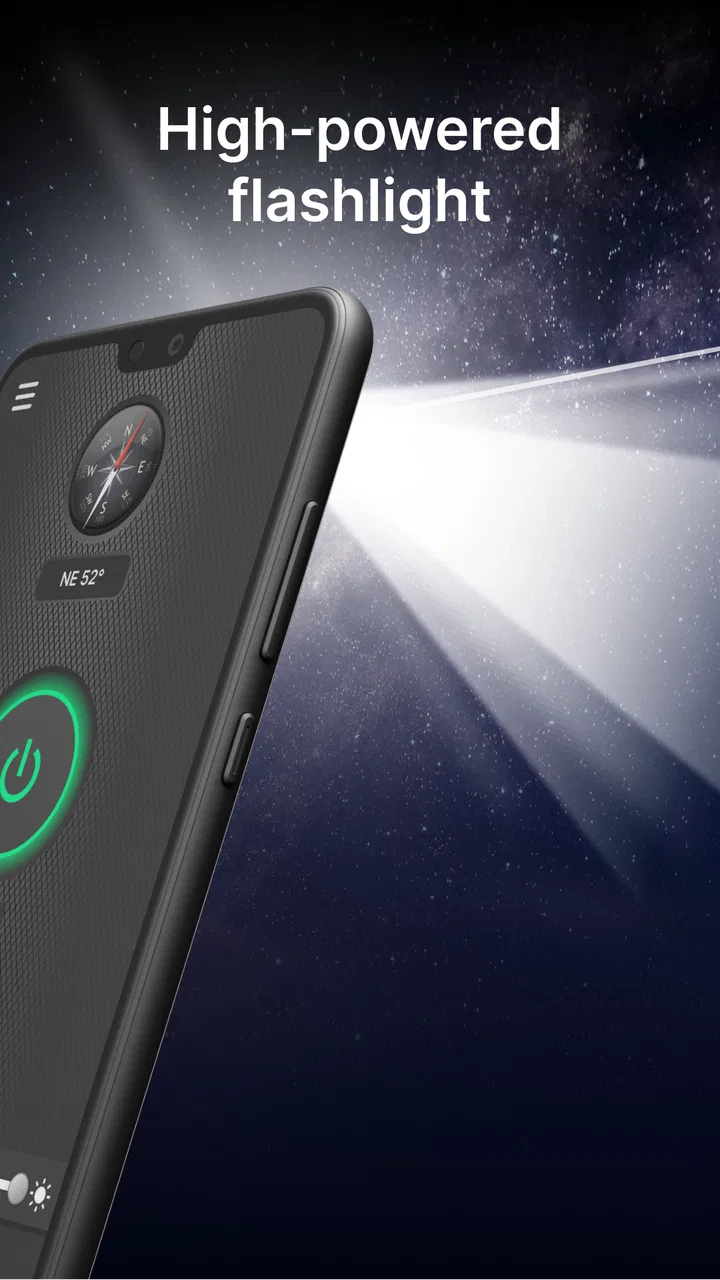
This app approaches the problem as a launcher rather than as a broad utility suite. Its store summary presents it as a flashlight and magnifying-glass launcher for emergencies, while its short description focuses on brightness. In practice, that positioning tells me what to expect: quick access is the point, not a long list of controls or a complicated interface.
The distinction from the built-in flashlight is subtle but useful. The system control is usually faster when it is already visible in quick settings. Brightest Flashlight Launcher becomes more appealing when I prefer a dedicated entry point, want the magnifying function nearby, or do not want to rearrange the phone’s standard controls. It is not automatically better than the built-in option; it is a more deliberate alternative for people who want these tools grouped together.
The first setup is about habit, not customization
My first useful step was deciding where this app should live. A launcher only saves time if I can reach it without searching through several screens. I would place its icon on the home screen, in a dock, or in another location I already use for practical tools. That simple choice has more effect on everyday speed than repeatedly adjusting settings.
I also recommend testing the light before relying on it outdoors. A quick check shows whether the phone’s flash behaves as expected and whether the button placement feels comfortable when I am holding the device with one hand. This is especially worthwhile before using it during a power interruption or while walking to a car at night. A tool meant for emergencies should be familiar before the emergency arrives.
The magnifying-glass side deserves its own trial. I found it most useful for short, close-up tasks rather than as a replacement for a dedicated magnifier. Small labels, fine print, a tiny switch marking, or a hard-to-read cable connector are the kinds of jobs where opening a camera-based view can be more convenient than squinting. The value is not that it transforms the phone into specialist equipment; it is that the second utility is close at hand when the flashlight is already relevant.
One practical habit is to open the app in a bright room and learn the controls by touch. Then try it in a dim area without staring at the screen. That exercise reveals whether the app actually fits your routine. If I still need to pause and hunt for the correct control, the launcher has not removed enough friction for my needs.
Where the flashlight earns its place
The most convincing scenario is a familiar one: I wake up at night and hear something fall in another room. The phone is beside me, but turning on the overhead light would disturb everyone. A dedicated shortcut lets me get illumination quickly, check the floor, and put the phone away without navigating through unrelated apps. The same pattern works when looking for a dropped key under furniture or checking whether a door is fully closed.
It is also useful when arriving home with full hands. I can use the light to find the lock, inspect the keyhole, or see a step that is poorly lit. The advantage is measured in seconds, but the bigger benefit is avoiding the awkward sequence of putting bags down, unlocking the phone, and searching for a control.
During a power outage, the app can serve as an immediate light source while I look for candles, a lamp, or a power bank. I would not treat a phone flashlight as a long-term replacement for emergency lighting, because sustained use affects battery life and leaves the phone less available for calls. Still, it is valuable during the first few minutes, when quick visibility matters most.
Another less obvious use is checking a vehicle or bicycle in low light. I can point the beam toward a tire, a loose strap, or a dark storage compartment while keeping one hand on the phone. For this kind of inspection, a phone light is more convenient than carrying a separate torch, though a dedicated flashlight remains the better choice for distance, extended work, or harsh outdoor conditions.
The magnifying function is useful when the camera app is too much
The magnifying-glass feature adds a practical reason to keep this app accessible. I use this kind of view when the problem is not darkness but scale: reading a tiny marking, checking a small piece of hardware, or examining a detail on packaging. The workflow is quicker than opening the camera, switching modes, and trying to hold the phone steadily while searching for the right framing.
There is a trade-off, however. A magnifying view depends on the phone’s camera and the available light, so it cannot solve every visibility problem. In a dark room, adding the flashlight may help, but glare can make shiny surfaces harder to inspect. I get better results by angling the phone slightly instead of pointing the light straight at reflective text. That small adjustment is more useful than simply increasing brightness.
I would also avoid treating it as a medical or precision inspection tool. It is suitable for everyday close-up viewing, not for diagnosing skin conditions, examining electronics at a professional level, or replacing an optical magnifier when detail and stability are critical. The app is strongest when it handles a quick nuisance, not when the task demands specialized equipment.
What it removes from the usual phone routine
The main friction removed is context switching. A standard camera app brings extra controls, image capture options, and a broader interface that I do not need when I only want to see something. The built-in flashlight control is often excellent, but it does not naturally connect to magnification. This app places both needs under one practical destination.
That can be especially helpful for family members who do not want to learn where a manufacturer has moved quick settings after a system update. A clearly placed icon is easier to explain: tap it, choose the light or magnifying function, and return to the task. I would still show the person the controls in advance, because “simple” varies from one user to another.
The app’s popularity suggests that this straightforward approach resonates with many phone owners. It has an average rating of 4.2 from around 30 thousand ratings, and it has passed one million installs. Those figures do not guarantee that it will suit every phone or every user, but they do indicate that the basic idea has found a substantial audience.
It is also free, which makes trying it low-risk. The Everyone content rating makes it appropriate as a general household utility rather than an app aimed at a narrow age group. I would still judge it by how quickly it works on my particular device, because practical usefulness depends more on access and responsiveness than on the download decision itself.
Small trade-offs I noticed before recommending it
The first trade-off is duplication. Most Android phones already include a flashlight, and many include camera tools that can enlarge a view. Installing another app only makes sense if the combined access is more convenient for you than the system tools. If your phone has a physical shortcut or an easy lock-screen flashlight, the built-in option may remain faster.
The second is battery awareness. A bright light is useful precisely because it draws attention to a nearby scene, but leaving it active while searching a large area can consume power. I make a habit of turning it off immediately after the task and checking the screen before putting the phone away. This sounds obvious, yet it is easy to miss when the light is being used while walking or carrying something.
The third is hand position. A phone flash is attached to the camera area, so covering the back of the device or holding it at an awkward angle can reduce the useful beam. For reading a label, I prefer holding the phone slightly to the side rather than directly above the object. For walking, I keep the light pointed toward the ground ahead rather than straight into someone’s face.
There is also a question of expectations. The name emphasizes brightness, but brightness alone does not determine usefulness. Beam direction, distance, battery condition, and the phone’s own hardware matter too. I would not choose this app as a substitute for a rugged torch used on worksites, during camping, or for extended outdoor navigation.
Who should use it and who should skip it
I think it is a good fit for people who regularly need a quick light around the home, want a dedicated shortcut, or appreciate having magnification beside the flashlight. It is also sensible for anyone who helps a less technical family member keep essential tools in one obvious place. The app’s narrow purpose is a strength when I want an uncomplicated answer to a small physical-world problem.
I would skip it if the phone’s lock-screen flashlight is already effortless and I never need magnification. I would also look elsewhere if I need advanced camera controls, document scanning, image saving, color adjustment, or a specialized reading aid. Those jobs call for apps designed around them rather than a compact flashlight launcher.
Users who are especially sensitive to extra app icons should make the same comparison. A dedicated utility can be convenient, but it adds another item to maintain and remember. For me, the decision comes down to frequency: if I reach for a light or close-up view several times a week, the shortcut earns its space; if I use those functions only once every few months, the built-in tools are probably enough.
My verdict after using it as an everyday utility
Brightest Flashlight Launcher succeeds because it focuses on a recurring annoyance instead of trying to become an all-purpose toolbox. Developed by AtomApplications, it is currently at version 3.18.0 and supports devices running Android 10 or later. Those details make it a current, accessible option for compatible phones, while the free price keeps the experiment simple.
What I value most is the reduction in hesitation. I do not have to decide whether to open the camera, search quick settings, or look for a separate magnifier. I can go directly to the practical tool I need, then close it and continue. That is not a dramatic feature, but it is the kind of small improvement that becomes noticeable through repetition.
My recommendation is therefore conditional but positive. Install it if you want one recognizable place for a flashlight and a basic magnifying view, and take a minute to position the shortcut where your hand naturally goes. Keep a separate torch for demanding outdoor or emergency use, and remember that the built-in control may be faster on some phones. For ordinary household interruptions, dark corners, tiny labels, and quick checks, this app removes enough friction to be genuinely worthwhile.
FAQs for Brightest Flashlight Launcher
01Is Brightest Flashlight Launcher free to download and use?
Yes, Brightest Flashlight Launcher is free to download and use. While the core features are available at no cost, some advanced features or ad-free experiences might require in-app purchases. Users can enjoy a fully functional flashlight and home screen customization without any initial charges.
02Does Brightest Flashlight Launcher affect battery life?
Brightest Flashlight Launcher is designed to be efficient, but using the flashlight consistently or for extended periods can drain your battery faster. The app itself is optimized to minimize battery consumption during normal use, but users should be mindful of their device’s battery levels when using the flashlight feature.
03Is Brightest Flashlight Launcher safe and secure?
Safety and security are top priorities for Brightest Flashlight Launcher. The app does not collect personal data without user consent and follows strict privacy policies. However, as with any app, users should regularly update to the latest version to ensure all security patches are applied.
04What customization features does Brightest Flashlight Launcher offer?
Brightest Flashlight Launcher offers a variety of customization options, including custom icons, themes, and widgets to personalize your home screen. Users can also access different light modes for the flashlight, such as strobe and SOS, adding both utility and style to their device.
05Can Brightest Flashlight Launcher be used on all Android and iOS devices?
Brightest Flashlight Launcher is compatible with most Android and iOS devices. However, some older models may not support all features, such as advanced themes or certain flashlight functions. Users should check the app's compatibility with their specific device model before downloading.
Pros
- Easy-to-use interface for quick access.
- Bright and reliable illumination.
- Low battery consumption mode.
- Customizable light settings.
- Works offline without issues.
Cons
- Contains in-app advertisements.
- Limited advanced features.
- No support for colored lights.
- Requires frequent updates.
- Permissions might concern privacy.

Brightest Flashlight Launcher
Gallery